
Welcome to Blogs
Discover actionable insights, in-depth research, and expert perspectives, all in one place.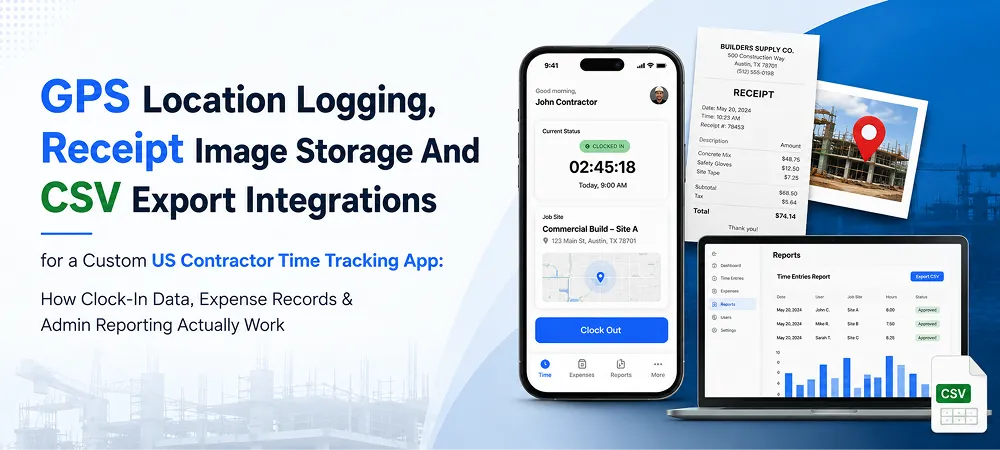
App Development 7 min read
GPS Location Logging, Receipt Image Storage And CSV Export Integrations for a Custom US Contractor Time Tracking App: How Clock-In Data, Expense Records & Admin Reporting Actually Work

Building a tailored GPS clock-in time tracking app integration contractor platform requires a highly disciplined scope. Every digital integration must generate legally defensible financial and labor records.
The core system connects field activities directly to your administrative database. This framework links event-based location tracking with automated cloud receipt processing. It also incorporates instant menu updates and rapid corporate data transfers.
Many expanding service companies invest in custom mobile app development to secure these features. This tailored strategy guarantees stable connections across diverse field environments. Office administrators maximize efficiency through dedicated web application development for real-time compliance oversight.
A single missing coordinate creates vulnerable gaps during official labor audits. Similarly, corrupted receipt image files disrupt critical internal reimbursement processes. In 2026, field systems must execute these essential tasks flawlessly. This article explores how these integrated backend components operate together.
GPS Location Capture at Clock Events
Accurate field tracking demands a reliable approach to gathering geographic data. The application logs coordinates instantly without draining worker device batteries. This architecture provides verifiable operational visibility while respecting field crew privacy.
How Location Is Captured at Each Clock Event
When a field worker taps the mobile screen, the application pings active satellites. The system records latitude and longitude coordinates during that precise second. The platform attaches this location data directly to the user profile.
The entry also preserves the chosen trade and active project site. This method ties four data points together into one unalterable record. Supervisors view exactly who clocked in, when, and from where.
This real-time capture eliminates manual errors and traditional timesheet guesswork entirely. The automated background process operates instantly without requiring additional user steps. The resulting data log stands up firmly to strict corporate scrutiny.
Event-Only vs Continuous: the Architecture Decision
Pre-built software platforms track field worker movements throughout the entire workday. This continuous monitoring creates detailed breadcrumb paths that map every movement. Our specialized framework captures locations only during specific shift changes.
Continuous tracking often causes friction and worsens staff retention issues significantly. Workers frequently object to constant corporate surveillance during their personal breaks. The event-only model provides sufficient verification without tracking private time.
This design answers your primary operational question regarding site presence clearly. It validates worker attendance precisely when shifts officially begin and end. This focused data collection policy minimizes unnecessary data storage costs over time.
GPS as Verification, Not Surveillance
Event-based coordinates serve as a lightweight verification shield for your business. The system cross-references device location against the designated project perimeter. This automated step confirms true site presence before approving shift hours.
You protect your business against wage inflation and time theft vulnerabilities. This strategy avoids the legal complications associated with continuous employee tracking. Several state regulations restrict tracking workers outside official working hours. Because state-level privacy, labor, and monitoring laws fluctuate across the US, business owners must verify current local tracking restrictions with qualified employment counsel before implementation. This architectural overview does not constitute formal legal advice.
The event-only setup provides clear proof of attendance during disputes. It protects company profits while maintaining excellent relations with field crews. This approach balances corporate oversight needs with respectful employee data privacy.
Our engineering team utilizes tailored custom software development to store these coordinates securely. The resulting database architecture allows rapid retrieval during weekly payroll audits. Managers can verify field data integrity without navigating messy third-party systems.
Receipt Image Pipeline (Capture, Compress, Store, Retrieve)
Managing paper expense receipts from remote job sites often challenges accounting teams. Lost or damaged documents cost service companies thousands of dollars annually. A digital pipeline preserves financial data from the hardware store to the ledger.
Workers take a photo using the integrated in-app camera tool. Capturing documents at the point of sale preserves optimal legibility. The application compresses the image file directly on the mobile device.
Compression ensures rapid uploads over weaker field cellular networks on site. The system transmits the minimized file directly to the secure receipt image upload app AWS S3 cloud storage. The database organizes these uploads using unique employee and submission codes.
The admin console pulls files by date range for immediate display. Reviewers see clear receipt images alongside structured purchase fields simultaneously. This automated data pipeline removes the need to browse storage buckets manually.
The timestamp, user ID, and image remain locked together permanently. This unified record fulfills IRS accountable plan rules for business reimbursements. Your financial data remains secure and completely audit-ready for upcoming years.
Admin-Managed Dropdown Architecture & Real-Time Sync
Static lists in generic platforms frequently restrict rapidly growing field operations. A custom architecture allows your management team to update options instantly. This direct control eliminates software vendor dependency when managing job data.
The system stores project sites and active trades as relational tables. Office administrators manage these values directly through a secure web console. You can add new locations or archive completed projects instantly.
When you save changes, the backend triggers an immediate sync sequence. The central server transmits the updated dataset to all active devices. Field workers see the new project options within a few seconds.
This architecture maintains high data consistency across your entire operational footprint. Field teams cannot input misspelled names or select obsolete project codes. This automated sync protects database hygiene before data reaches your office.
A contractor launching a new site cannot wait for vendor assistance. Administrative control means your software adapts to business changes in real time. This flexibility saves considerable time when managing multiple fast-moving job sites.
CSV Export & Account Verification Workflow
Administrative workflows require secure gatekeeping and effortless data transfer capabilities. Raw field information must integrate cleanly into your existing back-office tools. This connection eliminates manual work and secures sensitive corporate project logs.
CSV Export for Payroll Systems
The management dashboard converts active time sheets into standardized data files. The system structures a clean CSV payroll export time tracking file format automatically. The document includes worker names, selected trades, hours, and coordinates.
The column layout mirrors standard import configurations for leading payroll systems. The file integrates directly with systems like QuickBooks, ADP, and Gusto. Administrators download the report and upload it directly into accounting software.
This layout removes the need for manual column remapping every week. Eliminating manual data entry prevents costly typing errors during payroll calculations. Accountants complete complex weekly processing routines in a fraction of the time.
Account Verification & Deactivation
The platform utilizes a structured account verification workflow contractor loop to secure data access. New crew profiles remain locked in a pending queue after registration. The web system notifies managers immediately when a user applies.
The worker receives a confirmation text once the administrator grants access. Unverified users cannot view project locations or input fake hours. This barrier keeps your proprietary operational data fully protected from day one.
Administrators deactivate old worker accounts with a single click on the dashboard. Deactivation revokes system permissions instantly while preserving historical labor entries. You retain vital regulatory records without maintaining active licenses for departed staff.
These core system integrations affect your upfront application construction investments. Technical complexities and data pipeline configurations act as primary software cost drivers. Read our complete analysis in the Cost to Build a Custom Time Tracking App guide.
Push Notification Architecture
Timely communication keeps remote field operations moving forward according to schedule. The application utilizes transactional alerts to guide crews through administrative steps. This targeted notification stack operates quietly without overwhelming worker devices with spam.
The platform triggers alerts based on three specific operational events. Workers receive a push notification time clock app confirmation after clicking the screens. This message confirms successful data logging and stops duplicate time entries.
The system alerts administrators immediately when workers submit new expense receipts. Real-time alerts encourage prompt reviews and prevent massive backlogs at month-end. The platform also alerts workers when managers approve their profile registrations.
Our engineering framework uses Firebase Cloud Messaging to route Android alerts safely. The backend connects to the Apple Push Notification service for iOS devices. These transactional messages trigger automatically and deliver critical information within seconds.
Final Thoughts
Understanding these core technical components allows you to design a superior platform. Event-based tracking provides clear operational proof without compromising field team privacy. Cloud-based receipt pipelines preserve financial records and streamline internal bookkeeping workflows.
Custom dropdown lists give your office total control over project configurations. Standardized file exports eliminate manual entry errors during intensive payroll cycles. Secure verification processes gate system access to keep company information safe.
In 2026, successful contracting firms build specialized software architectures to scale operations. This technical focus streamlines labor documentation and prepares your business for the future. Evaluate the backend design of your upcoming field management platform carefully.
Focus on event-only tracking and robust cloud data storage mechanisms. These core decisions dictate whether your tool generates legally defensible records. A well-engineered platform solves documentation gaps instead of duplicating your current paperwork errors.
Learn more about digital transformation solutions from a leading custom AI software and app development company serving US based start-ups and enterprises.
FAQ
How does GPS clock-in work in a contractor time-tracking app?
When an employee initiates a clock event, the application requests a current device-location estimate and records the latitude, longitude, location accuracy, event time, employee, project, and selected cost code. The backend should validate the event and preserve any later corrections separately. Mobile devices can derive location through multiple technologies, so the process should not be described as simply pinging GPS satellites.
What location data should be saved with a clock event?
A useful location record can include latitude, longitude, estimated horizontal accuracy, device timestamp, server-received timestamp, permission status, project, and verification result. Recording accuracy is important because coordinates are estimates, not perfectly exact measurements. Android location objects include location coordinates, time, and an accuracy estimate, while users may also grant approximate rather than precise access.
Does a GPS coordinate prove that an employee worked the recorded hours?
No. A coordinate can help verify that a device was near an expected location at a particular time, but it does not independently prove who held the device, what work occurred, or whether every compensable minute was recorded. Federal wage records focus on accurate hours, pay, overtime, and payroll information rather than GPS coordinates. Location should support, not replace, reliable timekeeping and supervisor review.
What location permission should a clock-in app request?
An event-based clock workflow should usually begin with foreground or “When In Use” location access because the employee actively requests the clock event while using the app. Apple and Google both favor collecting only the minimum location scope needed. Background access should be reserved for a core feature that cannot function through foreground or transactional location capture.
How should the app handle denied permission, weak accuracy, or no internet?
The application should use a defined exception workflow rather than silently failing or inventing a location. It can display the accuracy level, request a fresh reading, allow a reason-coded manual submission, or hold the event for supervisor review. For offline use, the app can store a signed local event and synchronize it later while retaining both device and server timestamps, retry history, and conflict status.
How should receipt images be captured and stored?
The app can photograph or select a receipt, validate its file type, resize or compress it, and upload it to private cloud storage. The database should store expense metadata and an object reference rather than exposing a public file URL. The admin portal can retrieve the image through authorized, time-limited access. Amazon S3 objects are private by default, and presigned URLs can provide temporary access.
Is a receipt image enough to satisfy IRS expense-record requirements?
Not necessarily. A receipt may show the date, amount, merchant, and nature of the purchase, but it may not establish the project, destination, business purpose, mileage, or employee relationship. The app should collect structured expense details alongside documentary evidence. An accountable plan also requires a business connection, timely accounting, and return of excess reimbursement.
What security controls should protect receipt images?
Receipt storage should use private buckets, encryption, role-based access, short-lived download links, access logging, backups, and a documented retention schedule. Amazon S3 encrypts new objects at rest by default, but access policies and application authorization remain essential. Versioning or Object Lock may be added where the business has a documented need to prevent deletion or replacement for a defined period.
Core Development
Keep exploring the custom services.

AI Software Development
Custom AI Software Development
Build intelligent, production-ready software from machine-learning models to AI-driven automation designed around your business goals.
Learn more
Mobile App Development
Custom Mobile Application Development
Native and cross-platform mobile apps that are fast, secure, and built to scale across iOS and Android.
Learn more
Web App Development
Custom Web Application Development
Scalable, secure web applications, from customer portals to complex dashboards, tailored to how your business actually works.
Learn more



