| TL;DR AI is now mainstream in software development, with 84% of developers already using or planning to use AI tools to boost productivity. AI enhances efficiency across the SDLC by automating coding, testing, documentation, reviews, and decision-making. Human expertise remains critical, as AI augments engineering judgment but does not replace strategic thinking or accountability. Measurable metrics are important for tracking real impact, including cycle time consistency, PR size, review depth, and contribution spread. Responsible AI adoption requires guardrails that cover security, code validation, risk management, and continuous training. Partnering with an experienced AI development team helps businesses scale AI safely, ethically, and sustainably. |
As AI has already been working wonders across all industries through its intelligence, automation, and productivity, its role in software development has been nothing short of transformative. Most technology-focused enterprises have been shifting their efforts towards increasing the productivity of developers and software engineers with AI.
According to the StackOverflow survey, 84% of respondents either use or plan to leverage AI tools in their software development process. By integrating all forms of AI into the holistic software development lifecycle (SDLC), businesses can enable their engineers, Product managers, and experts to spend more time on high-value work and less on routine tasks and operations.
AI enables engineers to focus on strategic processes and creative problem-solving by enhancing software development, creating a symbiotic relationship in which technology augments human expertise. In this blog, we shall discuss why AI has become an integral part of software development and how to use AI in software development to drive your business efficiency.
Benefits of AI in Software Development
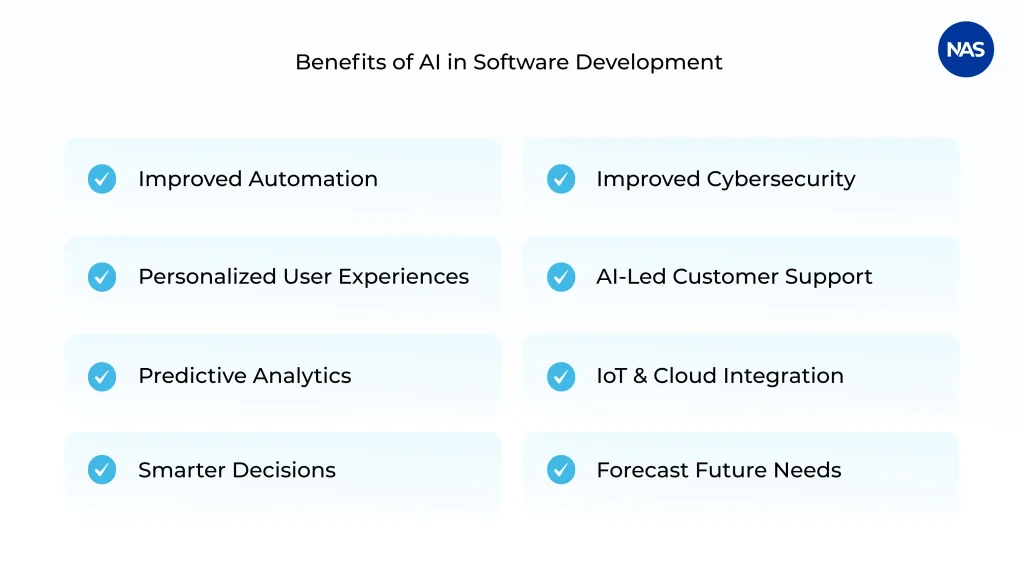
Before delving into the steps on how to use AI in software development, let’s understand the benefits of adopting an AI-led software development process.
1. Enhanced Automation for Business Efficiency
Automation is a crucial way in which AI transforms software development. By automating reporting, data entry, and customer inquiry management, organizations can allocate their human resources to more strategic operations. The advantages of AI-driven automation are:
- Minimized operational costs
- Reduced human error
- Improved turnaround time
For example, using AI-enabled chatbot development services to incorporate chatbots into custom CRM systems can help automate lead classification, schedule follow-ups, and provide real-time analytics. This ensures smooth operations, persuading companies to expand without increasing labor costs. AI automation has laid a cornerstone for businesses that seek scalability.
2. Personalized User Experiences
Personalization is no longer an optional feature; it is expected by default. AI software development enables custom software to understand user behaviour, preferences, and interactions, enabling highly personalized experiences. The use cases include:
- E-commerce applications that offer AI-led product recommendations
- Generative AI software development in healthcare that customizes patient treatment plans
- Learning platforms that adjust content as per the student’s performance
Personalization enhances engagement and scales customer loyalty, eventually contributing to long-term growth.
3. Advanced Predictive Analytics
The potential of AI in software development extends to analyzing massive datasets, offering businesses predictive insights unattainable with manual techniques. By integrating predictive analytics into custom software solutions, businesses can identify trends, anticipate customer requirements, and make informed decisions in advance.
For example,
- Financial applications that predict market fluctuations
- Supply chain software that conducts demand forecasting
- Marketing tools that measure campaign performance.
Predictive analytics helps decision makers implement practical intelligence, thereby minimizing risks and increasing opportunities.
4. Smarter Decision-Making Using AI Insights
AI-led dashboards and data visualization tools transform raw data into real-time insights. Instead of relying on intuition, business leaders can make evidence-based and informed decisions. The key benefits include:
- High-end precision in strategic planning
- Quick KPI tracking
- Data-supported insights to ensure quick adjustments
For instance, incorporating Natural Language Processing (NLP) enables executives to enter queries in English and receive instant, comprehensive data-supported responses. This demonstrates the way AI software development firms enable intelligent business leadership.
5. Improved Cybersecurity
As cyber threats develop, security strategies should adapt as well. AI-enhanced custom software can detect atypical activities, understand weaknesses, and respond instantaneously to threats. AI cybersecurity capabilities include:
- Real-time anomaly detection
- Automated threat responses
- Continuous vulnerability assessments
In segments such as healthcare, finance, and e-commerce, AI-led cybersecurity ensures compliance, secures customer trust, and prevents costly breaches.
6. AI-Centric Customer Support
Customers expect accurate, quick, and round-the-clock assistance. AI integration in custom software development is an ideal approach that helps businesses provide instant assistance through voice assistants, chatbots, and self-service platforms. The core benefits are:
- Minimized response times
- Savings on costs spent on support teams
- Consistent and accurate data delivery
In addition to improving customer satisfaction, it also ensures businesses can scale their support without resource overloading.
7. Effortless Integration with IoT & Cloud
AI integration is highly effective when paired with Internet of Things (IoT) and cloud computing. Custom software development using AI can help you oversee the connected devices, assess data across different distributed systems, and improve performance.
The examples include:
- Smart manufacturing platforms that manage equipment utilization
- Cloud-based logistics apps that improve delivery routes
- Intelligent home solutions that dynamically change energy consumption
This collaboration ensures that businesses stay smart, scalable, and well-prepared for the future.
8. Preparation for AI-Driven Future Scalability
As businesses evolve, the software also needs to scale exponentially. In addition to assisting you in managing your workflows, AI also helps you forecast future needs, helping your organization to adjust effectively.
Here are the strategies to ensure longevity with AI:
- Persistent learning models that vary according to the user requirements
- Modular software architecture enabling seamless AI feature enhancements
- Cloud-native infrastructure to implement high-end scalability
This keeps AI integration as a lasting investment, ensuring that the custom software remains highly competitive.
Best Practices You Should Adopt in AI Software Development
1. Use AI to Implement Planning & Design
In the planning phase, AI can save you from costly mistakes down the road. Rather than starting from scratch or overlooking major considerations, you can leverage AI to discover approaches, evaluate ideas, and structure projects appropriately from day one. AI systematically handles every aspect of a discrete requirement and exposes the possible solutions that typically arise midway through the sprint.
2. Utilize AI as an Architectural Decision Tool
As per the recent Stack Overflow survey, 76.6% of developers use or plan to use generative AI in software development, and architecture decisions make the best application for it. They wish something would challenge their assumptions without ego or politics. The value arises from AI asking the queries your team wouldn’t. Each architectural choice has trade-offs, which are worth overlooking. With AI, you don’t require perfectly built instructions to begin. You can feed it raw, unfiltered project notes, and it routes them into detailed milestones.
3. Consider AI as a Pair Programmer to Generate Code
According to the Stack Overflow survey, 82% of developers use AI for code generation. Being the most tangible advantage with a quick payoff, AI makes the boundaries clear. In practice, AI is the best way to write API endpoints and for data migrations. AI has encountered multiple login forms, but has never been part of your particular authentication flow. It understands REST patterns; however, it can’t understand your API conventions. Use AI only with a proper understanding of the code it generates to use it effectively.
Let’s better understand it with a simple checklist that eliminates most AI-specific issues:
- Do I understand what the code is for?
- Did I check for edge cases?
- Is the error handling proper?
- Can my team maintain this?
- Does it adopt the regular coding standards?
- Have I tested it using real data?
This might even look like overhead; however, it is quicker than debugging the massive failures in production.
4. Automate Documentation Process
Gartner reports that 42% of organizations using GenAI leverage it for document generation. AI agents manage the documentation tasks specifically well in:
- API documentation from code
- Code comments and docstrings
- README files
- Database schema documentation
- Troubleshooting guides
- Release notes
- Onboarding documentation
- Architecture decision records
The process becomes much easier when AI offers the first draft. For instance, let’s say a team wishes to document their authentication system. They feed the code to AI, which writes detailed API docs. The team then spends time reviewing, changing the technical details, and including examples. They finish it quickly, eliminating the need for a full sprint.
5. Ensure Code Quality & Maintenance
Maintenance tasks pile up in each codebase; however, developers rarely focus on them. AI gives the team the power to alleviate technical concerns and quality issues without causing difficulties to developers. Using AI for automated testing and QA processes is an excellent approach. AI helps you throughout the testing phase, including planning, generation, execution analysis, and maintenance.
You can also leverage AI to catch bugs that human reviewers could usually miss. Writing a comprehensive test manually can cost a developer a whole week. Rather, when you give functions to AI and get full test suites in a very few hours, your team can review them, polish edge cases, and quickly eliminate redundant checks for better coverage, compared to the manual technique.
6. Streamline Version Control & Collaboration
Imagine a situation where senior engineers have PRs in the queue while they try to complete their own features. Junior developers wait for feedback and lose momentum; when the review comes back, they have already been context-switched to another process. AI accelerates reviews at every phase, running the routine checks, explaining the complex changes, and providing the context reviewers demand. Merging code that has been sitting for days takes just a few hours.
Note: Time savings can vary depending on team size and codebase complexity.
AI writes detailed PR descriptions and defines complex changes. Your reviewers can analyze the code faster, and reviews can be completed in one day. You can also adopt AI to implement cross-team coordination. Once you change a shared API, AI learns which teams to notify and writes the message.
7. Push Your Team Forward For Continuous Learning
Your team needs to implement something beyond your expertise. They might usually waste hours reading documentation that assumes knowledge you don’t hold, or the Stack Overflow answers that resolve slightly different concerns.
Here’s how AI helps developers along the learning process:
- You define a vague requirement, and AI comes with options to handle it.
- You inquire about unfamiliar concepts, and AI provides examples in your language.
- You wish to have assistance in choosing patterns, and AI compares trade-offs for your use case.
- You need implementation help, and AI offers you working code with explanations.
Examples of AI in Action
AI usage in software development is redefining the way we design, test, and optimize products. It is no longer about AI software development for novelty, but about embedding AI for development into daily workflows to scale accuracy, speed, and collaboration. AI is leading change with the following:
- AI-driven code generation: Developers gain a significant productivity boost from tools such as GitHub Copilot, which can draft complex functions.
- Review Pattern Detection: Smart systems identify recurring review errors or missed quality checks across the teams.
- Bottleneck Detection & Mitigation: AI analyzes workflow data to identify inefficiencies, minimizing deployment and development delays.
Even the largest businesses are seeing tangible profits. ANZ Bank held a six-week study with GitHub Copilot with almost 1000 engineers, with incredible results. Productivity shot up, job satisfaction grew, and developers reported increased confidence in tackling complex operations. To be precise, AI doesn’t replace human skill when used intentionally; instead, it supercharges it.
Key Metrics to Consider
1. Responsiveness
AI tools help in surfacing relevant feedback more quickly, reducing the time between approvals and pull requests. Monitoring how quickly reviews are opened, commented on, and merged lets you understand how generative AI use cases in software development influence collaboration.
- What it defines- the efficiency with which reviewers engage with code changes, and if the feedback loops get tightened.
- Why it matters- lower review times often mean greater team alignment and fewer blockers in the delivery cycle.
- If it turns out to be lagging- slow response times might suggest reviewers are unclear about expectations. Review automation or clear ownership can be of help.
2. PR Size & Frequency
AI usually encourages more frequent pull requests by suggesting focused code snippets. This minimizes risk and scales traceability.
- What it defines- how AI helps you fragment large tasks into smaller chunks.
- Why it matters: frequent yet smaller PRs can lead to lower defect rates and quicker merges—the core aspects that improve efficiency through AI in software engineering.
- If it turns out to be lagging- oversized, or infrequent PRs can indicate a need to guide on using AI-generated code effectively.
3. Review Depth & Monitor Feedback Volume
AI can manage routine checks, allowing you to delve deeper into insights and strategic feedback. Tracking feedback volume and comment depth reveals whether this balance works.
- What it defines- The quality and relevance of review discussions.
- Why it matters- Valuable feedback ensures high code quality and team learning, which AI can’t replace, but can magnify.
- If it turns out to be lagging- low comment volume can signify that the reviewers highly depend on AI suggestions or skip peer collaboration.
4. Contribution Spread
AI tools help make complex work easier, helping more people build things, even if they don’t belong to classic ‘software engineer’ roles. Monitoring the contribution spread reveals whether this actually happens.
- What it defines: The extent to which work gets distributed across the team
- Why it matters: An optimized contribution means that AI is enabling, not concentrating productivity among a few individuals.
- If it turns out to be lagging: A lower contribution spread might suggest uneven AI adoption or knowledge gaps in implementing it.
5. Cycle Time Consistency
Cycle time is the time it takes for a change to travel from commit to production, and it is a great indicator of team health. AI-led automation can minimize variability and enhance predictability.
- What it defines: The steadiness of your software development and the effect of AI-led automation.
- Why it matters: Consistent cycle times mean your AI integrations help, not hinder the delivery flow.
- If it turns out to be lagging: Fluctuations would point to process flaws, uneven usage of AI, or over dependence on manual interventions.
How to Prevent the Potential Risks of Using AI in Software Development
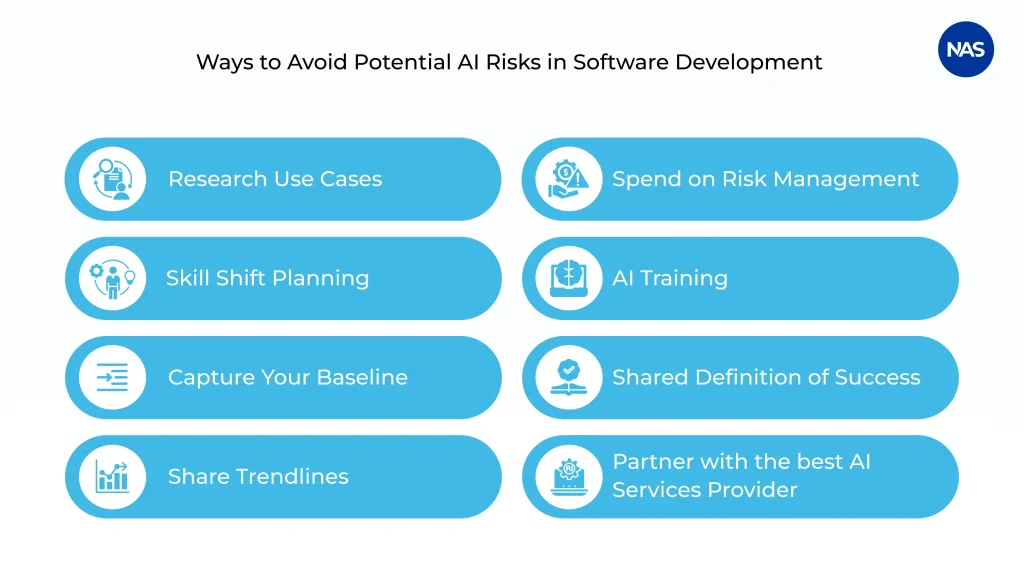
AI, to be short, doesn’t replace good engineering; instead, it raises the bar for it. Detailed processes, consistent reviews, and the best practices mentioned above are what make the innovation sustainable. It’s not only about learning how to use AI in software development; let’s learn a few ways your team can understand the AI’s risks and be prepared as it scales up its applications.
Research Use Cases
Ensure that the AI tool actually fits a requirement before adding another AI tool. Research where automation can generate a considerable impact, including accelerated testing or improved documentation, before turning to a complete rollout.
Spend in Risk Management
Consider AI like any other huge dependency: test, verify, and validate. Implement guardrails to review AI-generated code and build fallback processes to eliminate data leaks or corrupted results.
Plan for Skill Shifts
AI changes the way core skills are applied in engineering. Motivate developers to adapt—learning to prompt effectively, assess AI output, and debug with new tools. This is not about replacing expertise, but about evolving it.
Offer AI Training
Train engineers about the benefits and limitations of AI. A detailed understanding of how tools work can help your team use them responsibly and achieve the desired results.
Capture Your Baseline
Before AI integration, benchmark core metrics such as review responsiveness, cycle time, and PR size. This lets you measure true improvement rather than relying solely on vague impressions.
Learn What ‘Good’ Looks Like
Lay down a shared definition for ‘success’. Be it smaller PRs, quicker merges, or fewer post-release bugs, transparency in measurements helps develop trust and accountability throughout the team.
Share Trendlines Instead of Snapshots
Monitor progress over time rather than relying solely on single data points. Trendlines indicate whether AI adoption genuinely enhances consistency and collaboration or merely creates short-term bursts of activity.
Partner with an AI Development Company
The best approach to mitigating the risks AI poses to software development is to hire a reputable, credible AI development company. Partnering with the top AI development services provider can help you build the software while keeping security, reliability, and performance optimized.
Wrapping Up
AI integration in software development can be transformative, but only when you can actually witness what is happening. In an AI-dominated future, the requirement for human insight can’t be overstated. Despite AI advancements and the development of complex coding, the in-depth understanding and critical thinking that human intelligence provides remain irreplaceable. AI can learn patterns and recommend solutions, but the final decision to interpret complex data in context depends on human expertise.
Leveraging AI tools and AI software development services can help streamline the process. But, it won’t be easy for tech companies that should focus on rapid progress, ethical practices, upskilling, and rapid progress towards AI. In such situations, the best approach is to partner with an AI development company that has expertise in building software that leverages AI tools and technologies. With 16+ years of AI development expertise and 30+ years of software development services expertise, NewAgeSysIT has a team of AI experts who can ensure the efficient use of AI to build performance-centric, custom software tailored to your business needs. To explore more on how to use AI in software development, reach out to our team!
FAQ
1. How to integrate AI into custom software development?
Begin by defining impactful use cases, including personalization, analytics, and automation. Then choose the right AI models, prepare quality data, integrate using APIs, and continuously track performance after deployment.
2. What is the average cost to integrate AI into custom software?
The cost usually ranges from $20,000 to $150,000+, depending on the model type, data complexity, integrations, and scalability needs. Also, including advanced AI features and compliance standards can add to your investment.
3. How long does it take to implement AI features in a new software project?
Basic AI features can get implemented in six to ten weeks, whereas advanced AI features like GenAI or predictive analytics can take about three to six months, including optimization and testing.
4. How to ensure data privacy and security when integrating AI (like GDPR compliance)?
You can ensure compliance with encrypted data pipelines, anonymization, access controls, and frequent audits. Align AI workflows with GDPR policies and adopt secure-by-design development methods.
5. Why consider AI integration in your custom software?
AI integration scales automation, improves decision-making and personalization, and minimizes manual effort. These advantages of AI in software development help businesses scale quickly and work more efficiently.
6. How do I know if my business needs AI in its custom software?
If your system manages large data volumes and increases in task volume or demands real-time insights, AI can add value. Rising operational costs or slow decision cycles usually signal strong use of AI in software development.
7. How to choose between machine learning and generative AI for your project?
You can go for Generative AI software development in healthcare, which is widely used, as well as for chatbots, content creation, and code/document generation, aligned with your objectives. Choose Machine Learning (ML) to manage classification, prediction, pattern recognition, personalized recommendations, automation, computer vision, predictive analytics, etc.
Glossary
AI-Artificial Intelligence
API- Application Programming Interface
GenAI- Generative AI
IoT- Internet of Things
KPI- Key Performance Indicators
ML-Machine Learning
NLP-Natural Language Processing
PR- Pull Request
REST- Representational State Transfer
SDLC- Software Development Lifecycle
QA- Quality Assurance