
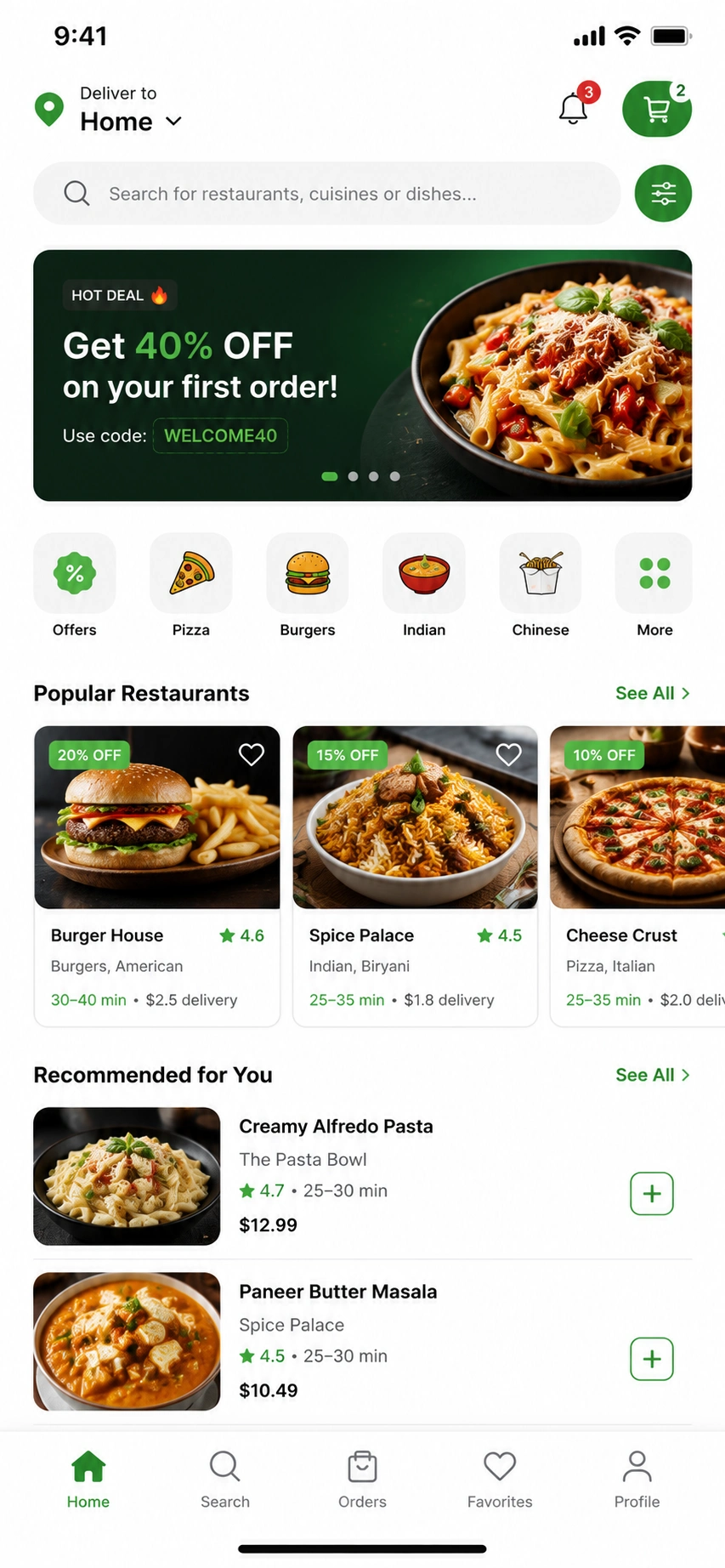
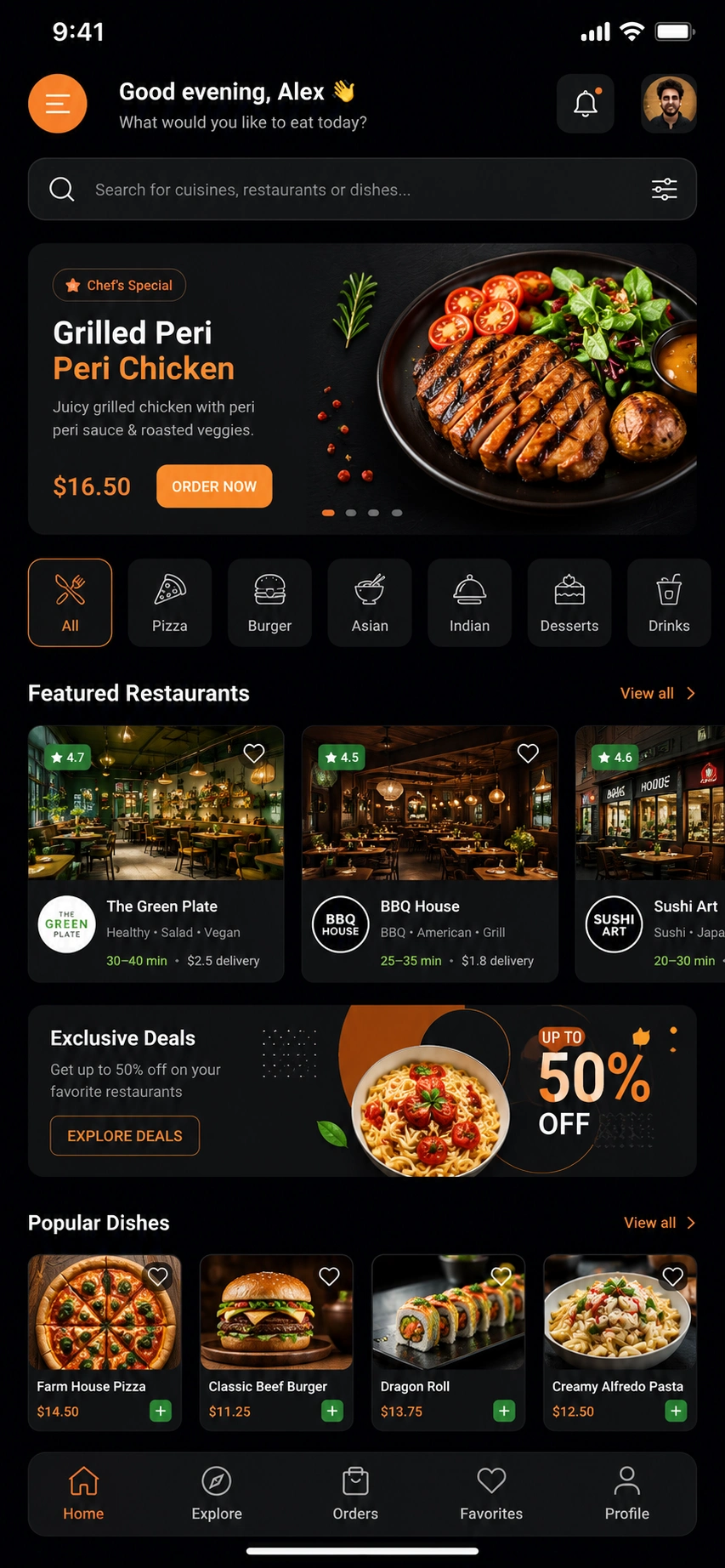


The MVP ships around digital menu, online ordering, secure payments via Stripe or Square, order tracking, and loyalty. POS integration routes orders straight to the kitchen and is the defining technical work.
In the United States in 2026, a single-restaurant ordering MVP costs $15,000–$50,000. A mid-tier app with POS integration, loyalty, and delivery runs $50,000–$150,000. A multi-vendor marketplace reaches $150,000–$450,000+.
This guide covers the full path from idea to a launched US restaurant app. It includes features, POS and delivery integration, tech stack, cost, timeline, and compliance. Digital ordering is now an operational essential for every restaurant category. Third-party aggregators charge 15–30% commission per order and withhold customer data.
A proprietary app protects margins and puts customer relationships back in the restaurant's control. This guide is for restaurant owners, chains, cloud kitchens, food-tech founders, product managers, and CTOs.
By the end, you will be able to scope, budget, and brief a restaurant app build. The single biggest cost fork is single-vendor versus multi-vendor. Restaurants without in-house engineers often partner with a specialist for custom restaurant app development.
What Is a Restaurant App?
A restaurant app is a mobile or web application for ordering food for pickup or delivery. Customers browse a digital menu, pay, track orders, and earn loyalty rewards.
It typically integrates with a POS system like Toast, Square, or Clover so orders are routed to the kitchen automatically. Chains like Chipotle and Domino's operate at this level. Smaller venues are powered by platforms like Square Online and Olo.
A restaurant app handles digital menu browsing, item customization, and secure payments. It supports online ordering for pickup, delivery, and dine-in. It also covers real-time order tracking, table reservations, loyalty and rewards programs, and push notifications. On the back-of-house side, orders route through the POS to a KDS (kitchen display system) for kitchen execution.
The category breaks down into distinct types. A single-restaurant or chain branded app serves one brand with direct orders. A reservation and table management app handles bookings, waitlists, and floor management.
A multi-vendor delivery marketplace operates like DoorDash or Uber Eats with restaurant, customer, and driver panels. A cloud-kitchen ordering app routes orders across delivery-only virtual brands.
The direct-ordering versus aggregator distinction matters most for margins. A direct app means the restaurant owns the customer. An aggregator means the restaurant rents access to one. POS integration is what separates a real restaurant app from a digital menu with no operational function.

Estimate Your App Development
Cost in Seconds
Discover your project budget with our interactive AI-powered app cost calculator.
Why Build a Restaurant App in 2026? (US Market & Opportunity)
You build a restaurant app in 2026 because direct digital ordering protects margins and customer relationships. Third-party aggregators like DoorDash, Uber Eats, and Grubhub charge 15–30% commission per order. They withhold customer data as well.
A proprietary app lets restaurants drive repeat direct orders, run loyalty programs, and own their customer relationships. The US food delivery and ordering market is measured in the hundreds of billions and continues to grow.
15–30%
Aggregator commission per order
3–9%
Typical thin restaurant margins
$10
Lost to a 25% fee on a $40 order
$100B+
US food delivery & ordering market
The aggregator commission squeeze is the defining business driver. On a $40 order, a 25% commission costs the restaurant $10. Thin restaurant margins of 3–9% cannot absorb that at volume.
A proprietary ordering app converts aggregator fees into direct margin. That math alone justifies the build cost for restaurants with consistent order volume.
The shift toward proprietary apps accelerated after 2020. Digital ordering is no longer a differentiator. It is an expected channel. Toast and Square data both show sustained growth in direct digital order volume across independent and chain restaurant categories.
The market opportunity differs sharply by audience. An independent restaurant or regional chain wins with a branded direct-ordering app. The goal is escaping aggregator fees and building a loyalty base.
A founder targeting a marketplace faces a far heavier two-sided build. Both customer and restaurant network effects must be built from scratch.
Loyalty and first-party data are the durable advantage
Loyalty and first-party data are the durable advantages of a direct app. An aggregator owns the customer relationship. A proprietary app gives the restaurant order history, preferences, and re-engagement capability. That data compounds over time. Aggregator dependency does not.
What Types of Restaurant Apps Can You Build?
The main restaurant app types are single-restaurant ordering apps, reservation and management apps, and multi-vendor delivery marketplaces. Cloud-kitchen apps serve delivery-only operations with virtual brand menus. Loyalty and rewards apps manage points, offers, and customer re-engagement. Each carries a sharply different scope, integration depth, and cost. Type determines cost before a line of code is written.
Single-Restaurant / Chain Branded Ordering Apps
A single-restaurant branded app serves one brand's menu for direct pickup and delivery orders. Chipotle and Starbucks are the benchmark examples. Square Online powers this model for smaller venues. This is the lightest scope and the best starting point for margin control. Loyalty integration is standard at this tier.
Reservation and Table Management Apps
Reservation apps handle bookings, waitlists, table and floor management, and dine-in flow. OpenTable, Resy, and SevenRooms are the named examples at scale. The core job-to-be-done is reducing no-shows and managing dining room capacity. Integration with the POS handles table status in real time.
Multi-Vendor Delivery Marketplaces
A multi-vendor marketplace hosts many restaurants and connects them to customers and drivers. DoorDash and Uber Eats define this category. It requires customer, restaurant, driver, and admin panels. Driver dispatch logic is the heaviest engineering component. Of all app types, this is the most expensive build by a significant margin.
Cloud-Kitchen / Virtual-Brand Apps
Cloud-kitchen apps serve delivery-only kitchens operating multiple virtual brands from a single facility. Orders route through a KDS to the correct station. Third-party delivery handles logistics. Menu management across brands is the defining back-of-house requirement.
Loyalty and Rewards Apps
Loyalty apps manage points, offers, and customer re-engagement. They are most often bundled directly into branded ordering apps rather than built standalone. Square Loyalty is the standard tool at the independent and small-chain tier. Push offers tied to order history drive repeat visit rates.
Got Problems? Let Us Help You With the Right Solution


Should You Build Custom or Use a White-Label Solution? (Build-vs-Buy)
Use a white-label solution when speed and budget matter most and your ordering needs are standard. Build custom when you need a differentiated experience, deep POS and loyalty integration, or marketplace logic. White-label cuts cost and time but limits flexibility and the customer data you control.
Three paths exist, each with distinct trade-offs.
White-label & SaaS platforms
White-label and SaaS platforms like Square Online, Toast Online Ordering, and Olo are the fastest route to launch. Setup costs are low and standard branding is included. POS and loyalty integrations exist but vary by provider, so verify compatibility before committing. Customer data access is governed by the platform's terms, not yours. This path suits small single-venue operators with standard ordering needs and tight timelines.
Clone / pre-built codebase
A clone or pre-built codebase sits in the middle. Proven architecture reduces build time and lowers cost relative to fully custom. Customization is possible but constrained by the base structure. This path suits operators who need some differentiation but cannot justify a full custom budget.
Fully custom development
Fully custom development offers maximum control over UX, data ownership, POS integration depth, and loyalty architecture. It carries the highest cost and the longest timeline. It is the right choice for regional chains, multi-location operators, and marketplace founders who need proprietary competitive advantages.
The decision heuristic follows restaurant size and data ambition. Single-venue operators with standard menus should use white-label. Regional chains with differentiated branding and loyalty priorities should build custom.
Marketplace and multi-vendor platforms require custom development without exception. Build-vs-buy is a major cost fork, comparable in impact to the single-vendor versus multi-vendor decision. Verify POS integration compatibility early regardless of which path you choose.
What Features Does a Restaurant App Need? (Must-Have + Advanced)
A restaurant app needs several core features at minimum. These include a digital menu with customization and online ordering for pickup and delivery. Secure payments via Stripe, Square, Apple Pay, and Google Pay are required. Real-time order tracking and push notifications round out the user experience. User accounts and POS integration ensure orders reach the kitchen reliably. Advanced builds add loyalty and rewards, table reservations, delivery dispatch, AI recommendations, and subscription or group ordering.
POS integration and real-time order tracking are the two features that determine whether the app works operationally. Orders that do not reach the kitchen make the app worthless regardless of how well the front end performs.
Customer-Side
Digital menu with item customization lets customers build orders to specification.
Cart and checkout handle order assembly and confirmation.
Payments run through Stripe or Square with Apple Pay and Google Pay wallet support.
Pickup and delivery selection routes the order to the right fulfillment path.
Real-time order tracking via Google Maps API shows kitchen and delivery status.
User accounts enable reorder, saved preferences, and loyalty tracking.
Push notifications via FCM and APNs handle order confirmation, status updates, and promotional offers.
Restaurant / Back-of-House
POS and KDS integration via Toast API, Square, or Clover routes incoming orders to the kitchen automatically.
Order management gives staff visibility into incoming, in-progress, and completed orders.
Menu management allows real-time item availability toggling without an app update.
Reporting surfaces order volume, revenue, and item performance.
Table and reservation management handles floor status and booking flow for dine-in operations.
Advanced / Differentiating
Loyalty and rewards programs via Square Loyalty track points and trigger offers based on order history.
Delivery dispatch with driver tracking via Google Maps API is required for first-party delivery operations.
AI menu recommendations powered by the OpenAI API personalize the ordering experience and lift average order value.
Group and scheduled ordering handles catering and advance orders.
Subscription perks offer recurring revenue and reduce per-visit friction for frequent customers.
How Do You Build a Restaurant App? Step-by-Step
You build a restaurant app in seven stages. First, choose the model and define the MVP. Second, decide build-vs-buy and plan POS and payment integrations early. Third, design the menu and order UX. Fourth, choose the tech stack and platform strategy. Fifth, develop the app, backend, payments, and POS integration. Sixth, test across devices, order flows, and peak load. Seventh, deploy to App Store Connect and Google Play Console, then iterate with analytics and loyalty.
-
1
Choose the model and define the MVP
Determine single-vendor or multi-vendor. Define the core ordering flow and set the feature cut-line for launch. A single-vendor customer app with POS integration and payments is the right MVP scope for most restaurant operators. The output is a product requirements document with a prioritized feature list.
-
2
Decide build-vs-buy and plan POS and payment integrations
Select white-label, clone, or custom based on differentiation needs and budget. Confirm POS vendor compatibility with Toast, Square, or Clover APIs early. Stripe handles payment processing. Payment and POS integration decisions made late in the project add cost and delay launch. The output is an integration plan and vendor confirmation.
-
3
Design the menu and ordering UX
Map the full customer ordering flow from menu browse through item customization, cart, checkout, and order confirmation. Wireframe the flow in Figma, prioritizing clarity at the menu and checkout steps. Friction at checkout directly reduces conversion. The output is a validated UI prototype.
-
4
Choose the tech stack and platform
Evaluate React Native or Flutter for cross-platform mobile versus Swift and Kotlin for native. Select backend language and cloud provider. Define the real-time order update architecture using Firebase. The output is a finalized tech stack document.
-
5
Develop the app, backend, payments, and POS integration
Build the customer app, restaurant admin panel, backend API, database, and payment layer in parallel workstreams. POS integration via Toast API or Square runs as a dedicated track. Custom software development teams with restaurant app experience sequence these workstreams to avoid blocking the main build on integration dependencies. The output is a functional build ready for testing.
-
6
Test across devices, order flows, and peak load
Run device matrix testing across iOS and Android. Validate every order and payment flow end to end. Load test at simulated rush-hour volumes. POS sync under concurrent order load is the most failure-prone test scenario. The output is a QA sign-off report.
-
7
Deploy and iterate
Submit to App Store Connect and Google Play Console. Configure production cloud infrastructure on AWS or Google Cloud. Launch analytics and loyalty tracking from day one. Monitor order completion rates and drop-off points in the first 30 days. The output is a live, monitored production app.
How Do You Integrate POS, Payments, and Delivery Systems?
You integrate a restaurant app by connecting to the POS via Toast, Square, or Clover APIs. This keeps menus in sync and routes orders directly to the kitchen. Payments run through a PCI-compliant gateway via Stripe or Square, plus Apple Pay and Google Pay.
Delivery runs through two models. The first is a first-party driver app with dispatch. The second uses third-party delivery-as-a-service via DoorDash Drive or Uber Direct. POS integration is the make-or-break technical work.
POS integration
Toast API, Square, and Clover each expose APIs for order injection and menu sync. Integration depth varies by POS vendor. Toast offers the most mature developer program for restaurant-specific workflows. Order injection sends confirmed customer orders directly to the KDS without staff re-entry. Menu and inventory sync keeps item availability current across digital and in-store channels. POS fragmentation across vendors is the main integration challenge for multi-location operators.
Payments
Stripe and Square handle payment gateway processing with tokenized, PCI-scoped card handling. Apple Pay and Google Pay reduce checkout friction on mobile. Payment tokens never touch your server directly. PCI-DSS compliance scope is reduced significantly by using tokenized gateway providers.
Delivery
First-party delivery requires building a driver app, real-time tracking via Google Maps API, and dispatch logic. This is a significant engineering effort. DoorDash Drive and Uber Direct offer delivery-as-a-service APIs that handle driver assignment and logistics without a driver app build. Using third-party delivery at launch is the standard recommendation. It avoids the cost of a driver app and lets the team validate demand before investing in logistics infrastructure.
Supporting integrations
Twilio handles SMS order confirmations and delivery updates. Google Maps powers delivery tracking on the customer side. Loyalty and CRM integrations feed order data into repeat-purchase programs.
What Tech Stack Is Used to Build a Restaurant App?
The dominant 2026 tech stack for a US restaurant app starts at the mobile layer. React Native or Flutter cover cross-platform builds. Swift and Kotlin serve native development. The backend runs on Node.js or Python. PostgreSQL serves as the primary database with Redis for session and order caching. AWS, Google Cloud, or Microsoft Azure handle hosting. Toast, Square, and Clover APIs handle POS integration. Stripe or Square handle payments. Google Maps powers delivery tracking. Firebase handles real-time order updates and notifications.
| Layer | Recommended Tools | Note |
|---|---|---|
| Customer Mobile App | React Native, Flutter, Swift (iOS), Kotlin (Android) | Cross-platform reduces build cost. Native preferred for biometric auth and device APIs. |
| Web Ordering + Admin | React.js, Next.js | Treat the restaurant admin dashboard as a separate web application development workstream with its own access and audit requirements. |
| Backend API | Node.js, Python (Django, FastAPI) | RESTful or GraphQL. All order and payment endpoints require role-based access control. |
| Database + Cache | PostgreSQL, Redis | Encrypted at rest. Use managed services such as AWS RDS for production reliability. |
| Cloud Hosting | AWS, Google Cloud, Microsoft Azure | AWS is the most mature option for restaurant-scale workloads. |
| Real-Time Orders | Firebase | Handles live order status updates across customer and kitchen screens. |
| POS Integration | Toast API, Square, Clover | Integration depth varies by vendor. Confirm API access scope before scoping. |
| Payments | Stripe, Square | PCI-DSS compliant. Tokenized processing minimizes compliance scope. |
| Delivery + Maps | Google Maps API, DoorDash Drive, Uber Direct | Use third-party delivery-as-a-service to avoid building a driver app at launch. |
| Notifications | FCM (Android), APNs (iOS), Twilio | Push notifications must not include payment data in payload. |
| AI Features | OpenAI API, AWS ML | For recommendations, upsell, and demand forecasting. |
Real-time order handling at peak load and POS sync reliability are the two architecture decisions that most affect production performance. Both must be stress-tested before launch.
The cross-platform versus native decision comes down to use cases. React Native and Flutter reduce cost and time for standard ordering apps. Swift and Kotlin native deliver better performance for apps with heavy device integration.
For most restaurant MVPs, cross-platform is the right starting point. Teams evaluating the mobile platform decision can weigh mobile app development options based on feature requirements and integration depth.
Speak With Our Consultant
Partners
Get expert guidance before you invest in AI software development. Work directly with Giovanni and Bibin to validate your technology direction, align AI with business goals, and make confident decisions that reduce risk and accelerate outcomes.
Request a Strategic Consultation
What AI & Automation Features Belong in a 2026 Restaurant App?
The AI features that strengthen a 2026 restaurant app cover six areas. AI menu recommendations and upselling lead the list. AI chatbots handle ordering and customer service. Demand forecasting and inventory optimization reduce waste. Dynamic pricing and promotions drive revenue. AI-driven loyalty personalization improves retention. AI delivery dispatch and ETA prediction serve marketplaces specifically. These are built on the OpenAI API and cloud ML services from AWS.
AI menu recommendations and upselling
AI menu recommendations use order history, time of day, and customer preferences to surface relevant items. They lift average order value without requiring staff intervention. Personalized upsell prompts at checkout convert at higher rates than static promotional banners.
AI chatbots
AI chatbots reduce customer service load for order status questions, modification requests, and menu inquiries. They handle high inquiry volume at peak hours without added staffing cost. Chatbot accuracy depends on integration quality with the order management system.
Demand forecasting and inventory optimization
Demand forecasting analyzes historical order data to predict volume by time period and menu item. Inventory optimization uses those forecasts to reduce waste and prevent stockouts. Both capabilities run on AWS ML or OpenAI API with order history as the primary input.
AI dispatch and ETA prediction
For marketplaces, AI dispatch assigns drivers to orders based on proximity, traffic, and estimated prep time. Accurate ETA prediction is a direct loyalty driver. Customers who receive accurate delivery estimates cancel and complain at lower rates.
AI belongs on the roadmap, not always in the MVP
AI adds meaningful cost to a build. API licensing, inference compute, and accuracy testing all carry budget weight. AI capabilities belong in the product roadmap for most platforms. They should not be in the MVP scope unless the recommendation or dispatch logic is the primary differentiating feature.
How Much Does It Cost to Build a Restaurant App in the US? (2026)
In the United States in 2026, a single-restaurant ordering app costs between $15,000 and $50,000 to build. Adding POS integration, loyalty, and delivery pushes a mid-tier app to $50,000 to $150,000. A multi-vendor marketplace climbs past that, reaching $150,000 to $450,000 or more.
The biggest cost drivers are single-versus-multi-vendor scope and POS and delivery integration. Panel count and ongoing maintenance also add significant cost. Maintenance runs 15–25% of build cost per year.
Cost by Build Tier
| Tier | Scope | Typical US Range | Timeline |
|---|---|---|---|
| Single-Vendor MVP | Digital menu, online ordering, payments, order tracking, basic POS integration, no driver app | $15,000–$50,000 | 2–4 months |
| Mid-Tier Platform | Full feature set, POS integration (1–2 systems), loyalty, delivery via third-party API, provider portal | $50,000–$150,000 | 4–6 months |
| Multi-Vendor Marketplace | Customer, restaurant, driver, and admin panels; dispatch logic; multi-POS support; AI features | $150,000–$450,000+ | 8–14+ months |
What Drives Restaurant App Cost the Most?
Ongoing & Hidden Costs
- • Cloud hosting on AWS or Google Cloud runs $500–$3,000+ per month for a single-venue app. Marketplace infrastructure runs higher.
- • Stripe payment processing fees apply per transaction.
- • Twilio SMS costs scale with order volume.
- • POS and delivery API fees vary by vendor and volume.
- • Annual maintenance runs 15–25% of the initial build cost.
- • Security reviews and platform update compliance are recurring, not one-time.
How Long Does It Take to Build a Restaurant App?
A restaurant app takes 2–4 months for a single-restaurant ordering MVP. A mid-tier app with POS integration and loyalty takes 4–6 months. A multi-vendor marketplace with customer, restaurant, driver, and admin panels takes 8–14+ months. POS integration depth and driver app and dispatch logic are the components that most extend timelines.
The build breaks into four major phases. Discovery, workflow design, and integration planning take 3–5 weeks and must be complete before engineering begins.
Core development covers the customer app, admin panel, backend API, payments, and POS integration. It runs for the bulk of the timeline. POS integration via Toast API or Square runs in parallel but depends on vendor API access confirmation.
QA covering device matrix, order flows, and peak-load testing requires dedicated calendar time. Compressing it creates production failures at launch. App Store Connect and Google Play Console submissions add 1–2 weeks for review. Cloud infrastructure configuration adds another week.
The most underestimated driver is POS integration depth
The most consistently underestimated timeline driver is POS integration depth. Teams that treat it as a fast-path activity routinely extend their timelines by 3–6 weeks. Planning for it explicitly with a buffer is among the highest-value decisions made during scoping.
What Are the Biggest Challenges & Mistakes When Building a Restaurant App?
The biggest mistakes when building a US restaurant app start with over-scoping. Founders validate single-vendor demand after building a full marketplace. POS integration gets treated as an afterthought. Backend corners get cut, forcing rewrites at scale. Peak-load reliability gets ignored until it fails. Loyalty and retention receive too little investment. Payment and accessibility compliance gets overlooked entirely.
Marketplace over-scope before validation
Building a full two-sided marketplace before proving single-vendor demand is the most expensive early mistake. Start with a single-vendor ordering app. Use DoorDash Drive or Uber Direct for delivery logistics. Validate order volume and customer retention before investing in a driver app and dispatch layer.
POS integration neglect
Orders that do not reach the kitchen make the app operationally useless. POS integration via Toast, Square, or Clover must be scoped as a first-class workstream. It is not a post-launch enhancement. Treating it as optional during the build creates a product that cannot function in a real restaurant environment.
Backend shortcuts
Saving $10,000 on backend architecture at launch seems smart. It creates a $50,000+ rewrite when the app hits 10,000 concurrent users. Real-time order handling under rush-hour load requires solid infrastructure from day one. This is not a problem to solve later.
Peak-load failures
Rush-hour order volumes stress every layer of the stack simultaneously. Load testing must simulate realistic concurrent order scenarios before launch. Failures during peak periods cause immediate customer churn and damage brand trust.
Weak loyalty investment
The primary justification for building a direct app is owning the customer relationship. Loyalty programs that do not activate repeat orders undermine that justification. Loyalty design should receive as much attention as the ordering flow.
Compliance blind spots
PCI-DSS, ADA accessibility, and FDA allergen and menu-labeling requirements are not optional. They are enforceable obligations. Skipping accessibility compliance is a documented US litigation risk for ordering apps.
What Compliance & Security Rules Apply to US Restaurant Apps?
US restaurant apps must comply with several regulatory frameworks. PCI-DSS governs card payment handling. CCPA and CPRA cover customer data privacy. ADA and WCAG set accessibility standards. FDA menu-labeling and allergen disclosure rules apply to qualifying operators. The security baseline covers HTTPS and TLS encryption, secure authentication, and payment fraud protection.
PCI-DSS and payments
PCI-DSS scope is minimized by using tokenized gateways like Stripe or Square. Card data never touches your server directly when tokenization is implemented correctly. Annual PCI compliance review applies to most operators regardless of gateway choice.
Data privacy
CCPA and CPRA apply to customer order data collected from California residents. State privacy laws vary. If the app serves EU customers, GDPR obligations apply as well. A privacy policy and data retention policy are required at launch, not after.
ADA & WCAG accessibility
ADA and WCAG 2.1 accessibility compliance is a real US litigation risk for digital ordering applications. Screen reader compatibility, color contrast standards, and touch target sizing all require deliberate design attention. Retrofitting accessibility after launch is significantly more expensive than building it in from the start.
FDA menu-labeling & allergens
FDA menu-labeling rules require calorie counts and allergen disclosure for chain restaurants operating 20 or more US locations. State-level allergen disclosure requirements apply more broadly. Verify current FDA and state obligations with qualified legal counsel before finalizing menu display design.
This section describes the compliance landscape as it stands in 2026. It is not legal advice.
How Do Restaurant Apps Make Money? (Monetization and ROI Models)
Restaurant apps make money primarily by driving direct orders that avoid aggregator commissions of 15–30% per order. Loyalty-driven repeat purchases and upselling drive higher average order value. Subscription and membership perks add recurring revenue. Marketplaces earn through per-order commissions and delivery fees from partner restaurants.
Cost avoidance (direct orders)
The core ROI logic for a single restaurant or chain is cost avoidance. Replacing $10,000 per month in aggregator fees with direct orders funds the app's build cost within months. That reframe changes the investment calculus from "how much does it cost" to "how fast does it pay back."
Per-order commissions (marketplaces)
Per-order commissions are the revenue engine for multi-vendor marketplaces. DoorDash and Uber Eats charge restaurants 15–30% per order placed through their platforms. A competing marketplace must price competitively to attract restaurant partners while covering logistics costs. Advertising placements within the marketplace add a second revenue line.
Subscription & membership perks
Subscription and membership perks work best for customers who order frequently enough to value a recurring discount or free-delivery tier. A monthly dining membership converts frequent customers into predictable recurring revenue instead of one-off orders. Square Loyalty supports tiered reward structures that incentivize higher order frequency on top of that base.
The revenue model should be chosen alongside the app type, not after. Subscription and per-visit economics work differently across dining categories.
Key Takeaways
1 Direct ordering protects margins against aggregator commissions of 15–30% per order.
2 POS integration via Toast, Square, or Clover is the operational core — orders that never reach the kitchen make the app useless.
3 The single biggest cost fork is single-vendor versus multi-vendor.
4 Build-vs-buy — white-label, clone, or custom — should match restaurant size and data ambition.
5 Loyalty drives the repeat-order revenue that justifies the investment.
6 PCI-DSS, ADA accessibility, and FDA allergen compliance are not optional.