Welcome to Blogs
Discover actionable insights, in-depth research, and expert perspectives, all in one place.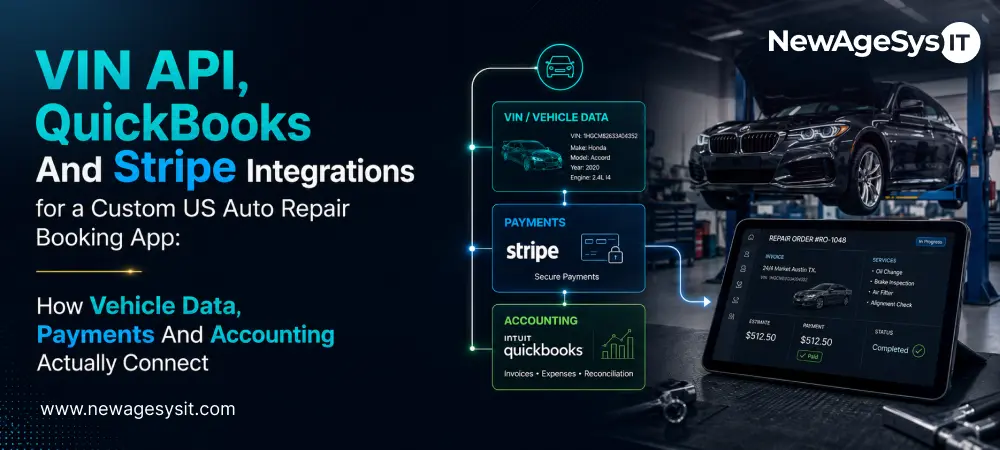
Automobile 6 min read
VIN API, QuickBooks And Stripe Integrations for a Custom US Auto Repair Booking App: How Vehicle Data, Payments And Accounting Actually Connect

| This article is part of our series on Custom Auto Repair Applications: Booking And Service Management Platforms for US Automotive Businesses in 2026 |
An auto repair booking app only feels simple when the integrations are planned well. For teams researching VIN, QuickBooks, and Stripe integrations, the real work starts behind the customer screen.
A Car-Up-style platform must identify the vehicle, collect payment, update accounting, and support repair chat. It also has to coordinate pickup or delivery without creating staff cleanup.
Each integration has a different job in that workflow. The VIN API turns a 17-character VIN into a usable vehicle profile. Stripe connects estimate approval, deposits, final balances, and payment links. QuickBooks receives paid invoices, customer records, line items, taxes, and payment status.
Real-time chat and dispatch logic sit around those systems. They make repair updates, media sharing, pickup windows, and customer notifications feel live.
For shops planning custom mobile app development, these integrations shape the booking experience. For teams building the dashboard behind it, web application development must support the same data flow.
This article explains how the integrations connect, where they fail, and what teams should verify before vendor selection. For the broader build strategy, see the custom auto repair app development guide.
VIN API Integration & Vehicle Profiles
VIN integration starts at booking, but its value continues through the repair. The vehicle record can support estimates, parts context, service history, and repeat visits.
What a VIN Decode Returns
A VIN decoder reads the 17-character VIN and returns vehicle specifications in real time. That usually includes year, make, model, engine, trim, and OEM attributes.
National Highway Traffic Safety Administration (NHTSA) vPIC is the free public decoder for vehicle specifications. Recall lookup is a separate NHTSA service, so it should not be treated as the same integration.
Commercial providers such as VinAudit or Vincario may add richer data, service-level support, and volume pricing. The right choice depends on the shop’s vehicle mix and booking volume.
Pre-Filling Booking and Storing Vehicle Profiles
Once the VIN is decoded, the booking form should pre-fill vehicle details automatically. Customers should not have to guess trim, engine type, or model year. The decoded profile should attach to the customer’s vehicle record. Repeat bookings can then start from saved data instead of another manual entry flow.
Choosing the API for Your Vehicle Mix
The main failure risk is poor coverage. Older vehicles, imports, heavy trucks, or EVs may expose gaps in some data sources. Shops should test real VINs before committing. Pricing should also match volume. Per-query pricing may suit smaller shops, while monthly plans may fit busy booking flows.
This is where backend integration architecture affects cost, accuracy, and daily usability.
Guest Booking Architecture Without Registration
Guest booking needs a real unauthenticated flow. The customer enters a VIN, selects the service, chooses a slot, and provides contact details. The platform identifies the vehicle, stores the booking, and sends confirmation by SMS or email.
The architecture has four important decisions:
- Session-linked booking record:
The system should store the booking without creating a half-built customer account. - Scoped booking-reference token:
The token should let the customer view only that booking. It should not expose broader shop, customer, or vehicle data. - SMS or email notifications:
Since there is no login or device token, the platform cannot rely on push notifications. - Profile upgrade path:
If the customer registers later, the guest record should attach to the new profile. That includes vehicle details, messages, approvals, invoices, and repair history.
This is different from most shop SaaS workflows. Those tools often assume the service writer creates the customer. A guest-first flow starts from the stranded customer’s phone. That gives the shop a better chance to capture urgent repair demand before another shop does.
Guest records also need retention and purge rules. VIN, contact details, service requests, and repair updates can become personal data when tied to a customer.
Stripe Payment Flows: Approval, Deposits, and Completion
Stripe should be designed around the repair workflow. The payment flow starts when the estimate is ready for customer approval. The customer reviews the line items, approves the work in-app, and creates a recorded approval event. That approval matters because payment should not outrun repair authorization.
Once the job is approved, Stripe can support several collection paths. For registered customers, the app can use a saved card. For guests, it can send a one-time payment link by SMS or email.
Large repairs may need split payment logic. A deposit can be collected at booking, with the balance paid when work is complete. This helps the shop secure commitment without building manual invoice workarounds.
Stripe Elements or Checkout keeps card data off the platform’s servers. That reduces Payment Card Industry Data Security Standard (PCI-DSS) scope, though implementation still needs review. The payment record should also be ready for QuickBooks. Customer, invoice, amount, tax, payment method, and status details need clean handoff.
QuickBooks Online Sync as Accounting Architecture
QuickBooks sync should be planned as accounting architecture, not a simple export feature.
What Syncs, and When
The cleanest trigger is payment confirmation. Once the invoice is paid, the platform can push the completed invoice into QuickBooks Online. That sync should create or match the customer record. It should also send invoice line items, tax details, payment method, and payment status. QuickBooks Online uses OAuth 2.0 and REST API connections for that handoff.
Line-Item Mapping Is the Real Work
The hardest part is not connecting to the QuickBooks Online API. It is mapping the shop’s repair data to its accounting structure. Labor, parts, diagnostics, discounts, deposits, taxes, and payment types may use different QuickBooks items or accounts.
Those mappings should be tested against real invoices during discovery. If this work is delayed until launch, every completed repair can create reconciliation cleanup.
When a Sync Fails Mid-Transaction
The platform also needs a failure plan because payment and accounting do not always succeed together.
A Stripe payment can complete while the QuickBooks API fails. The app should use idempotent sync operations, retry queues, duplicate protection, and a reconciliation view for unsynced invoices. That prevents a temporary API issue from becoming a missing invoice or duplicate record.
VIN, chat, and QuickBooks architecture choices can also affect development cost. The cost impact is covered in Cost to Build a Custom Auto Repair App.
Real-Time Chat & Pickup/Delivery Dispatch
Real-time chat should make repair updates visible without another phone call. Use WebSockets or Firebase Realtime Database for live messaging, not polling. Polling creates delays and makes the app feel stale.
A technician should be able to send photos, videos, and notes from the job record. Those updates should reach the customer through chat and push notifications. Repair photos and videos should sit in controlled cloud storage, such as S3, with access tied to the job.
Status updates should trigger notifications at key repair moments. Those include Received, In Progress, Awaiting Approval, Completed, and Ready for Pickup. That keeps the customer informed without forcing service advisors to send manual messages.
Pickup and delivery need the same discipline. A pickup request should capture location, preferred time, vehicle details, agent assignment, drive time, and buffer windows. The dispatch system should check agent capacity before a pickup slot is promised. That prevents the shop from making commitments it cannot keep.
Shops can still phase the build. Drop-off scheduling can launch first, while the dispatch model is prepared for pickup and delivery later.
Final Thoughts
VIN, Stripe, and QuickBooks define whether an auto repair platform runs cleanly after launch. The VIN choice affects vehicle accuracy at booking. Stripe design connects approvals, deposits, balances, and invoices. QuickBooks mapping decides whether payments become usable accounting records.
Shops should validate VIN coverage, payment timing, line-item mapping, and retry logic early. That helps avoid demo-ready integrations that fail in daily work. An experienced AI software development partner can scope those decisions before the build starts.
The customer-facing features these integrations support are covered in Custom Auto Repair App Features.
Core Development
Keep exploring the custom services.

AI Software Development
Custom AI Software Development
Build intelligent, production-ready software from machine-learning models to AI-driven automation designed around your business goals.
Learn more
Mobile App Development
Custom Mobile Application Development
Native and cross-platform mobile apps that are fast, secure, and built to scale across iOS and Android.
Learn more
Web App Development
Custom Web Application Development
Scalable, secure web applications, from customer portals to complex dashboards, tailored to how your business actually works.
Learn more